Making Deep Learning Accessible - Fast AI
For so long we have heard that for you to build deep learning models for any task, you need to be good at Mathematics - Linear Algebra, Calculus, Probability etc, but this has come to change.
Introducing - Fast AI
With Fast AI we move away from the notion that you first have to study the mathematical parts of deep learning before you can get to building actual models. Basically we use a Top-Down approach, as Jeremy Howard put it, where we start by building models first and then later get to learning the beautiful maths that powers these models.
Unlike trying to learn the maths first before getting to build models, this is a much better approach because it becomes easier and exciting to learn the Maths behind it once you have gotten practice with building actual models. Your own curiosity will push you to try and understand why this works or why something is not working as expected.
In my own experience it has been frustrating to learn the maths and not knowing where I am actually going to apply this. Long weeks of doing calculations without writing any code was a huge demotivator.
What is Fast AI
Fast AI is a library built on top of Pytorch that simplifies the task of training fast and accurate Neural Nets.
This is possible because of Fast AI's extensive API for many deep learning tasks, from data loading, data cleaning, training models and evaluating them, Fast AI offers a high level abstraction to these tasks. This makes training neural nets easier by also reducing the risks of getting errors since we write very minimal code as you will see.
Demo
To show the power of Fast AI, we will build a simple Computer Vision model to classify animal breeds. We will break down these tasks into four:
Data Loading
Data Cleaning
Model Training
Evaluation
1. Data Loading
We will first install fastai
!pip install fastai
With Fast AI installed, we will now download our training data - OXFORD-IIIT Pet Dataset. This is already built in to Fast AI
# Import everything for vision
from fastai.vision.all import *
path = untar_data(
    URLs.PETS
) # `untar_data` is a helper function that downloads data and unzips it.
100.00% [811712512/811706944 00:16<00:00]
# untar_data also returns the location of the decompressed archive
path, path.ls()
(Path('/root/.fastai/data/oxford-iiit-pet'),
 [Path('/root/.fastai/data/oxford-iiit-pet/images'), Path('/root/.fastai/data/oxford-iiit-pet/annotations')])
# get_image_files is a function that return all images in a folder
files = get_image_files(
    path/'images'
)
print(f"Found {len(files)} images")
Found 7390 images
Labelling data
To label our data, we will extract the name of the animal from the filename using regular expressions
files[0].name
'beagle_115.jpg'
regex = r'^(.*)_\d+.jpg'
To load our data we will need to use a DataLoaders object. Specifically ImageDataLoaders.from_name_re() - (From Regular Expressions). Fast AI provides different data loaders for different types of data you are working with, but for now since we are working with images, we will use ImageDataLoaders.
dls = ImageDataLoaders.from_name_re(
    path=path,
    fnames=files,
    pat=regex,
    item_tfms=Resize(460),
    batch_tfms=aug_transforms(size=224) # Resize images to 224 X 224, for deep learning all images must be of the same size
)
# Show the loaded data
dls.show_batch()
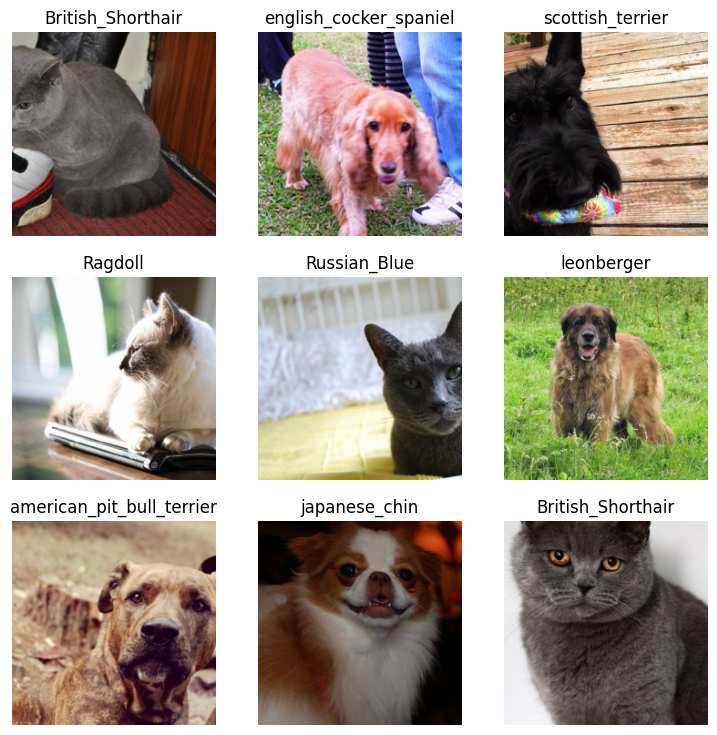
We have successfully loaded our data!! You can rerun dls.show_batch() to check is there are any incorrect labels
- Cleaning Data
The next step should be cleaing data right? Well actually not really, for Fast AI we actually train a model first and then we will use Fast AI's cool feature for data cleaning.
3. Model Training
In Fast AI, we train a Leaner. A Learner combines, a model and the data for training and uses transfer learning to fine tune a pretrained model. For this example we will fine tune a resnet34 model.
learn = vision_learner(
    arch=resnet34, # pretrained model
    dls=dls, # data
    metrics=error_rate # measure how worse the model is doing
)
Downloading: "https://download.pytorch.org/models/resnet34-b627a593.pth" to /root/.cache/torch/hub/checkpoints/resnet34-b627a593.pth


100%|██████████| 83.3M/83.3M [00:00<00:00, 165MB/s]
The above downloaded the resnet34 model which we will fine tune
learn.fine_tune(
    1, # how many times the model will see the data
    3e-3 # rate at which the model adjusts to reduce the error (Learning)
)
| epoch | train_loss | valid_loss | error_rate | time |
|---|---|---|---|---|
| 0 | 1.288479 | 0.342344 | 0.122463 | 00:36 |
| epoch | train_loss | valid_loss | error_rate | time |
|---|---|---|---|---|
| 0 | 0.487694 | 0.281343 | 0.086604 | 00:39 |
We now have a trained model that can classify the animal breeds. Lets get to testing
4. Model Evaluation
Let's see how the model predicts
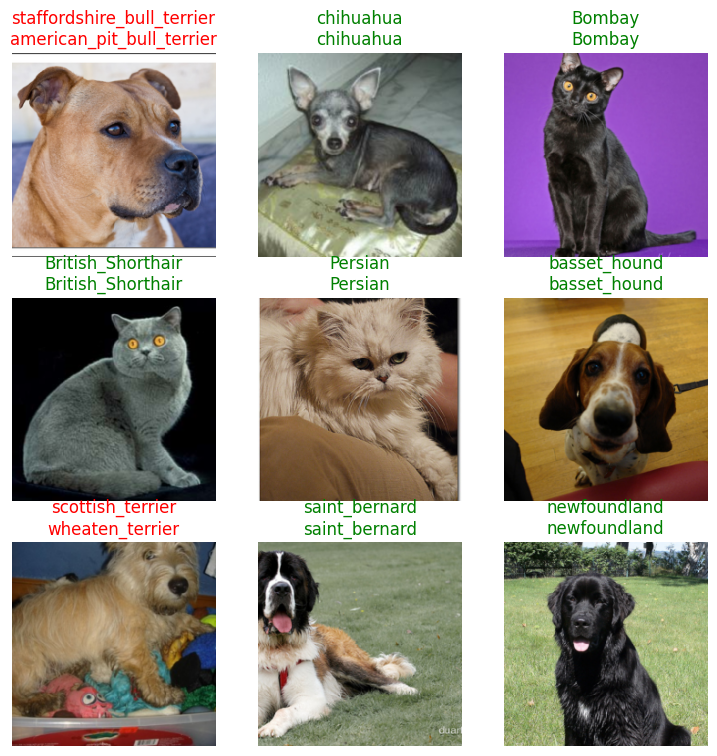
learn.show_results() # show predictions on images (green if the model was correct, red if it was wrong)
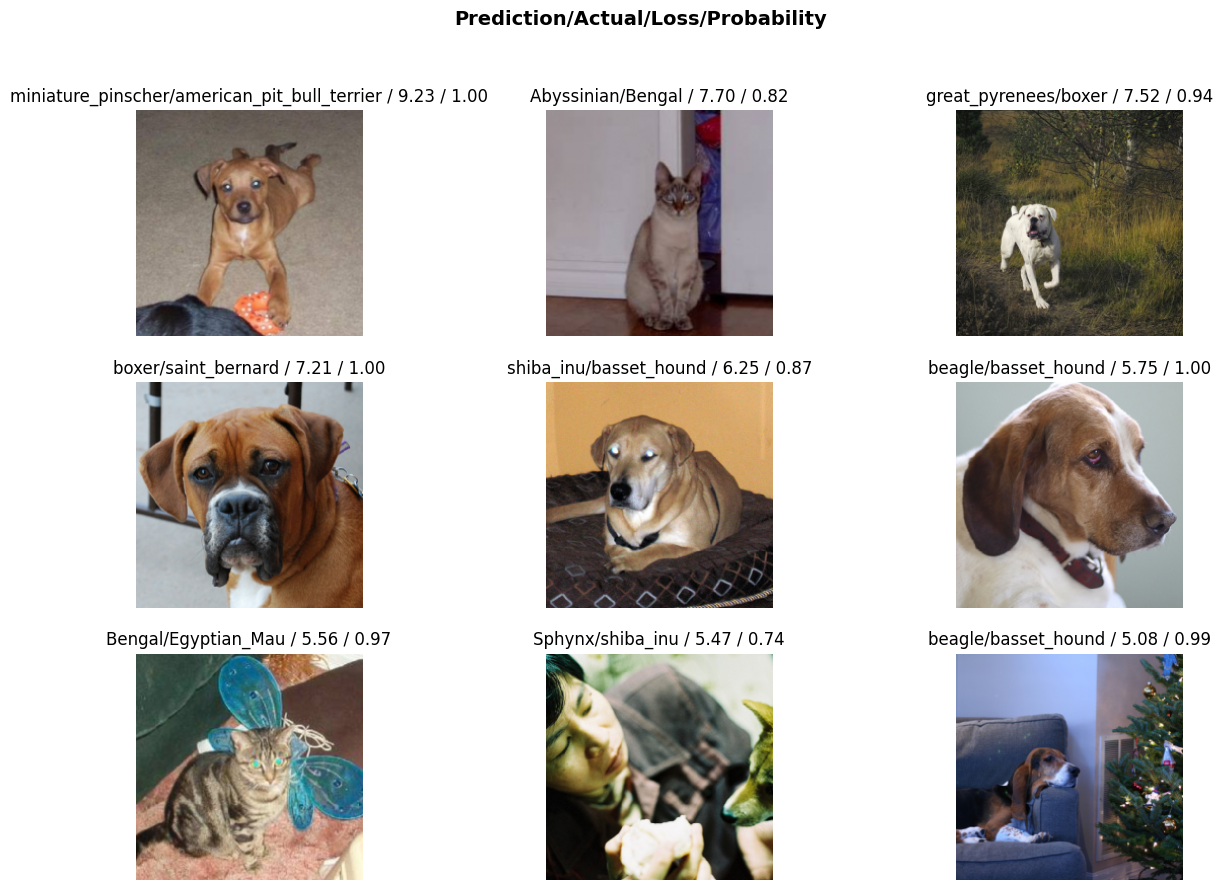
We can also use the interpretation object to see the model's worst responses:
interp = Interpretation.from_learner(learn)
interp.plot_top_losses(9, figsize=(15,10)) # plot the worst predictions
We can finally save the model and use it elsewhere in our applications
learn.export('my_model.pkl')
Further Actions
And we're done training the model, you can use the exported model in your applications or deploy it to Huggingface. Fast AI offers a book and a course Practical Deep Learning for coders. It goes deep into the Fast AI library and also deep learning, giving you all the knowledge you need to train deep learning models. It also introduces Maths concepts when needed. Enjoy!!
This blog was written by a human ♥


